> ## Documentation Index
> Fetch the complete documentation index at: https://requestly-mintlify-changelog-requestly-past-week-38456.mintlify.site/llms.txt
> Use this file to discover all available pages before exploring further.
# Pre-request & Post-response Scripts
> Learn how to use JavaScript in Requestly to customize API requests, process responses, and interact with variables, with examples.
***
Scripts in Requestly allow you to extend and customize your API requests and responses dynamically using JavaScript. These scripts enable you to manipulate requests before they are sent (Pre-request scripts) or process responses after they are received (Post-response scripts). With access to the full request and response objects, you can achieve advanced automation, validations, and transformations.
## **Pre-Request Scripts**
**Pre-Request Scripts** run before the API request is sent to the server. They allow you to modify request attributes, such as headers, body, query parameters, or even the URL. Pre Scripts are useful for adding authentication tokens, generating timestamps, or altering the request dynamically based on certain conditions.
Let’s try to understand the workings of pre-script using easy-to-follow examples.
**Auto Increment Page Numbers**
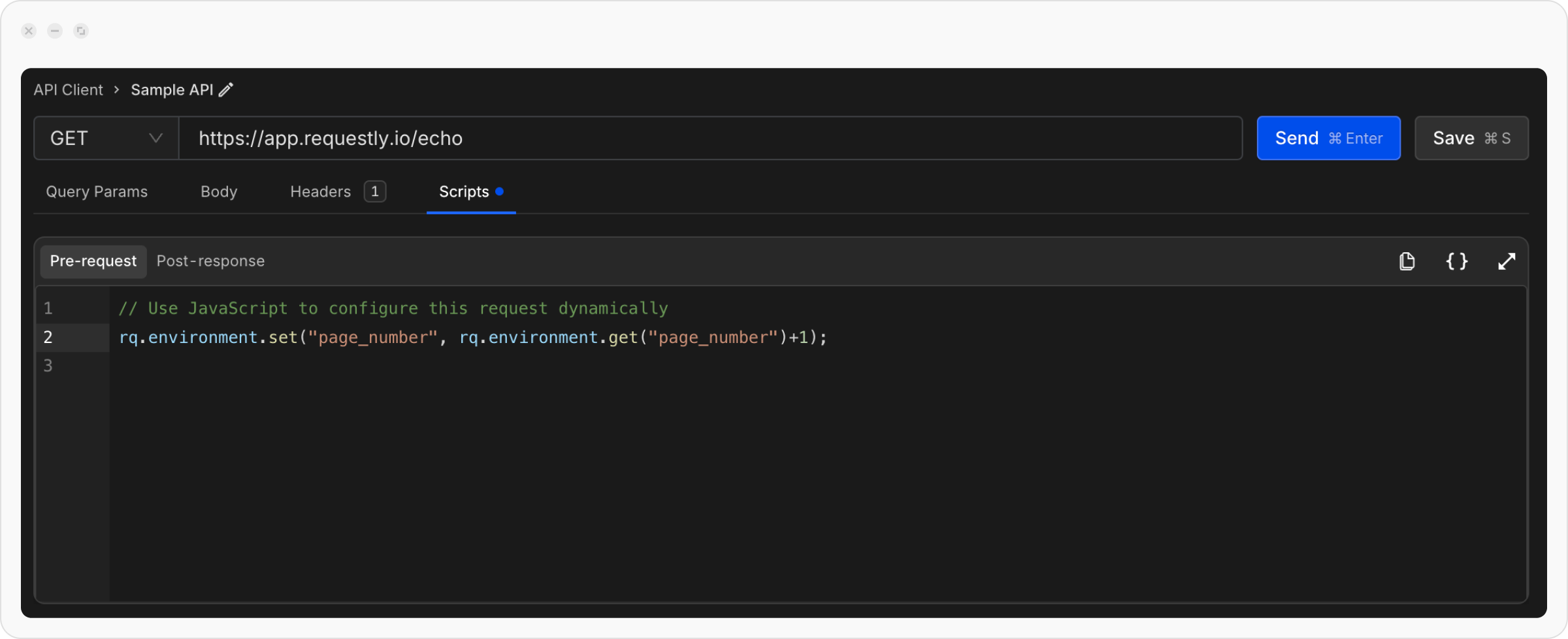
Let’s assume you have an endpoint that takes page number as query parameter, we use environment variable `{{page_number}}` to get value of page number.
```json theme={null}
https://app.requestly.io/echo?page={{page_number}}
```
We can get current page number from environment variables and set it back with an increment.
```json theme={null}
rq.environment.set("page_number", rq.environment.get("page_number")+1);
```
Now every time you click the Send button of this request it would send incremented page number.
**Test APIs by Randomising Values**
During development hitting an API with new data every time can be a pain, we can use Pre-Script to randomise the values and call the same API without getting duplicate entry error.
Let’s setup our request with body as follows:
```json theme={null}
POST:
```
```json theme={null}
{
"name": "{{name}}",
"email": "{{email}}",
"phone_number": "{{phone_number}}"
}
```
We will use below pre-script to create random values and update them in environment variables.
```jsx theme={null}
var name = (+new Date).toString(36).slice(-5);
var phone = Math.round((Math.random())*(10**10));
rq.environment.set("name", name);
rq.environment.set("email", name+"@example.com");
rq.environment.set("phone_number", phone);
```
You can also use pre-script to generate access tokens, validate the requests, generate some random data for the request.
You can also access elements of the request, collection variables and environment variables, checkout Requestly’s JavaScript API.
## **Post-Response Scripts**
**Post-Response Scripts** run after the API response is received. They allow you to process response data, validate outputs, or log details for debugging. Post Scripts are useful for transforming the response body, validating response codes, or storing results for further use.
Let’s try to understand the working of post script using easy to follow examples.
**Validate Response Code**
```jsx theme={null}
if (rq.response.code !== 200) {
console.error("Unexpected Response Code:", rq.response.code);
}
```
We can also fetch and set API Keys or auth tokens, id, and other data from response of an API and use it in other APIs.
You can access elements of the request, response, collection variables and environment variables, checkout Requestly’s JavaScript API.
***
## Requestly JavaScript API `rq`
Requestly provides a robust set of JavaScript properties and methods to interact with API requests, responses, environments, and global variables. Below is a detailed documentation of these features, explaining each property and function with examples.
### **Request Object** `rq.request`
These properties and methods let you access the details of the API request in scripts.
`rq.request.method`
Use this property to get the Request’s method. The HTTP method of the request (e.g. `GET`, `POST`, `PUT`, `OPTION`, `DELETE`, `PATCH`, `HEAD`).
**Example:**
```jsx theme={null}
console.log("Request Method: ", rq.request.method);
```
`rq.request.headers`
An list of header rows each having `key`, `value` & `isEnabled` for each custom header you create.
**Example:**
```jsx theme={null}
console.log("Headers: ", JSON.stringify(rq.request.headers));
```
`rq.request.body`
The body of the request, accessible as a string. If you have selected `Form` under `Body` it would be returned in `object` format.
**Example:**
```jsx theme={null}
console.log("Body:", JSON.stringify(rq.request.body));
```
`rq.request.url`
The full URL of the API request.
**Example:**
```jsx theme={null}
console.log("Request URL:", rq.request.url);
```
`rq.request.queryParams`
An object containing rows of query parameters each having `key`, `value` & `isEnabled`.
**Example:**
```jsx theme={null}
console.log("Query Params:", JSON.stringify(rq.request.queryParams));
```
***
### **Response Object** `rq.response`
These properties and methods let you access the details of the API’s response in scripts.
`rq.response.body`
The body of the response as a string.
**Example:**
```jsx theme={null}
console.log("Response Body:", rq.response.body);
```
`rq.response.responseTime`
The time taken by the request to complete, in milliseconds.
**Example:**
```jsx theme={null}
console.log("Response Time:", rq.response.responseTime);
```
`rq.response.headers`
An list of header rows each having `key`, `value` for each custom header you create.
**Example:**
```jsx theme={null}
console.log("Response Headers:", JSON.stringify(rq.response.headers));
```
`rq.response.code`
The HTTP status code of the response.
**Example:**
```jsx theme={null}
console.log("Response Code:", rq.response.code);
```
```jsx theme={null}
if (rq.response.code !== 200) {
console.error("Unexpected Response Code:", rq.response.code);
}
```
`rq.response.json()`
Parses the response body as JSON and returns it as a JavaScript object.
**Example:**
```jsx theme={null}
console.log("Response JSON:", JSON.stringify(rq.response.json()));
```
`rq.response.text()`
Returns the response body as a plain string.
**Example:**
```jsx theme={null}
console.log("Response Body as String:", rq.response.text());
```
### **Environment Variables Object** `rq.environment`
Environment methods let you dynamically manage environment variables during script execution.
`rq.environment.set(key, value)`
Sets an environment variable with the given key and value.
**Example:**
```jsx theme={null}
rq.environment.set("authToken", "Bearer ");
```
`rq.environment.get(key)`
Retrieves the value of the specified environment variable.
**Example:**
```jsx theme={null}
const token = rq.environment.get("authToken");
console.log("Token:", token);
```
`rq.environment.unset(key)`
Removes the specified environment variable.
**Example:**
```jsx theme={null}
rq.environment.unset("authToken");
```
### **Collection Variables Object** `rq.collectionVariables`
Collection variables are scoped to a specific collection. Unlike environment variables (scoped to a specific environment), collection variables are only accessible within the requests that belong to a given collection.
#### `rq.collectionVariables.set(key, value)`
Creates or updates a collection variable with the given key and value.
**Example:**
```javascript theme={null}
rq.collectionVariables.set("basePath", "/v1/users");
```
#### `rq.collectionVariables.get(key)`
Retrieves the value of the specified collection variable.
**Example:**
```javascript theme={null}
const path = rq.collectionVariables.get("basePath");
console.log("Collection Variable basePath:", path);
```
#### `rq.collectionVariables.unset(key)`
Removes the specified collection variable.
**Example:**
```javascript theme={null}
rq.collectionVariables.unset("basePath");
```
### **Global Variables Object** `rq.globals`
Global variables work similarly to environment variables. Global variables are available to all collections and requests.
`rq.globals.set(key, value)`
Sets a global variable with the given key and value.
**Example:**
```jsx theme={null}
rq.globals.set("appVersion", "1.0.0");
```
`rq.globals.get(key)`
Retrieves the value of the specified global variable.
**Example:**
```jsx theme={null}
const version = rq.globals.get("appVersion");
console.log("App Version:", version);
```
`rq.globals.unset(key)`
Removes the specified global variable.
**Example:**
```jsx theme={null}
rq.globals.unset("appVersion");
```
 Let’s try to understand the workings of pre-script using easy-to-follow examples.
**Auto Increment Page Numbers**
Let’s assume you have an endpoint that takes page number as query parameter, we use environment variable `{{page_number}}` to get value of page number.
```json theme={null}
https://app.requestly.io/echo?page={{page_number}}
```
We can get current page number from environment variables and set it back with an increment.
```json theme={null}
rq.environment.set("page_number", rq.environment.get("page_number")+1);
```
Now every time you click the Send button of this request it would send incremented page number.
**Test APIs by Randomising Values**
During development hitting an API with new data every time can be a pain, we can use Pre-Script to randomise the values and call the same API without getting duplicate entry error.
Let’s setup our request with body as follows:
```json theme={null}
POST:
Let’s try to understand the workings of pre-script using easy-to-follow examples.
**Auto Increment Page Numbers**
Let’s assume you have an endpoint that takes page number as query parameter, we use environment variable `{{page_number}}` to get value of page number.
```json theme={null}
https://app.requestly.io/echo?page={{page_number}}
```
We can get current page number from environment variables and set it back with an increment.
```json theme={null}
rq.environment.set("page_number", rq.environment.get("page_number")+1);
```
Now every time you click the Send button of this request it would send incremented page number.
**Test APIs by Randomising Values**
During development hitting an API with new data every time can be a pain, we can use Pre-Script to randomise the values and call the same API without getting duplicate entry error.
Let’s setup our request with body as follows:
```json theme={null}
POST: 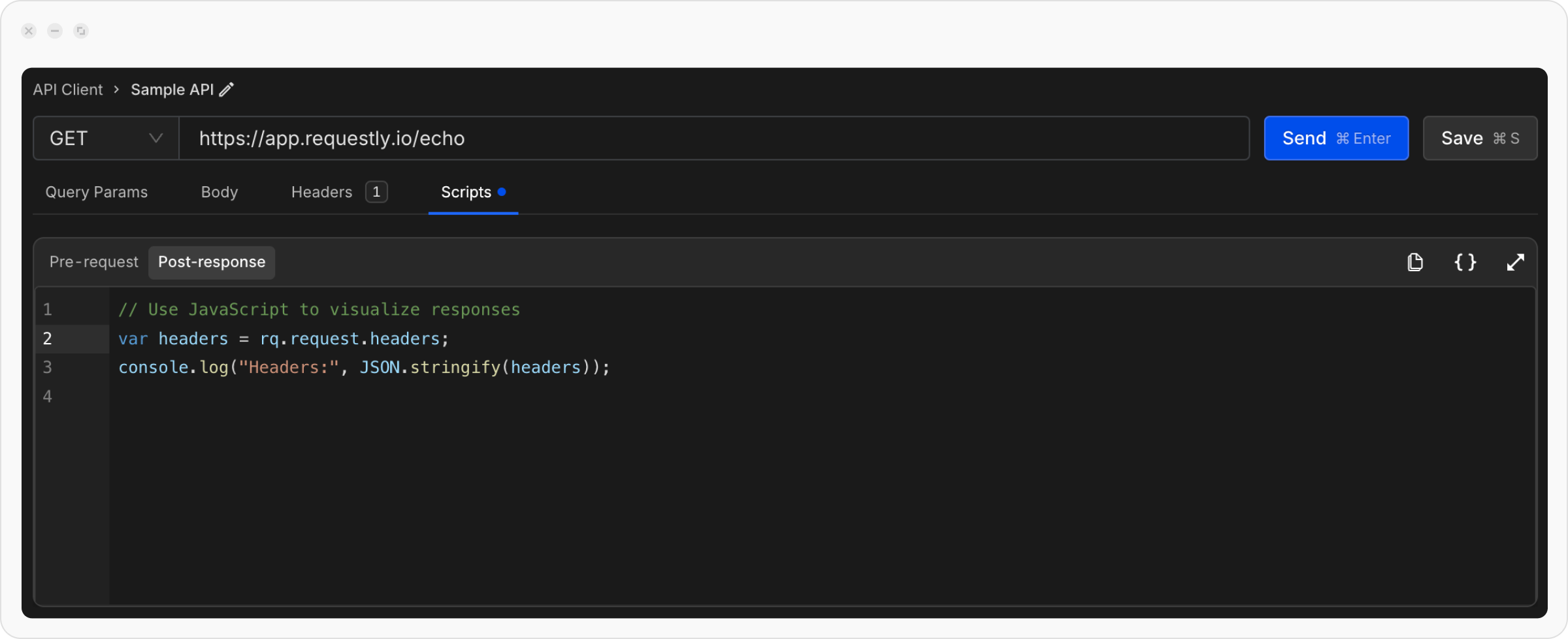 Let’s try to understand the working of post script using easy to follow examples.
**Validate Response Code**
```jsx theme={null}
if (rq.response.code !== 200) {
console.error("Unexpected Response Code:", rq.response.code);
}
```
We can also fetch and set API Keys or auth tokens, id, and other data from response of an API and use it in other APIs.
You can access elements of the request, response, collection variables and environment variables, checkout Requestly’s JavaScript API.
***
## Requestly JavaScript API `rq`
Requestly provides a robust set of JavaScript properties and methods to interact with API requests, responses, environments, and global variables. Below is a detailed documentation of these features, explaining each property and function with examples.
### **Request Object** `rq.request`
These properties and methods let you access the details of the API request in scripts.
`rq.request.method`
Use this property to get the Request’s method. The HTTP method of the request (e.g. `GET`, `POST`, `PUT`, `OPTION`, `DELETE`, `PATCH`, `HEAD`).
**Example:**
```jsx theme={null}
console.log("Request Method: ", rq.request.method);
```
`rq.request.headers`
An list of header rows each having `key`, `value` & `isEnabled` for each custom header you create.
**Example:**
```jsx theme={null}
console.log("Headers: ", JSON.stringify(rq.request.headers));
```
`rq.request.body`
The body of the request, accessible as a string. If you have selected `Form` under `Body` it would be returned in `object` format.
**Example:**
```jsx theme={null}
console.log("Body:", JSON.stringify(rq.request.body));
```
`rq.request.url`
The full URL of the API request.
**Example:**
```jsx theme={null}
console.log("Request URL:", rq.request.url);
```
`rq.request.queryParams`
An object containing rows of query parameters each having `key`, `value` & `isEnabled`.
**Example:**
```jsx theme={null}
console.log("Query Params:", JSON.stringify(rq.request.queryParams));
```
***
### **Response Object** `rq.response`
These properties and methods let you access the details of the API’s response in scripts.
`rq.response.body`
The body of the response as a string.
**Example:**
```jsx theme={null}
console.log("Response Body:", rq.response.body);
```
`rq.response.responseTime`
The time taken by the request to complete, in milliseconds.
**Example:**
```jsx theme={null}
console.log("Response Time:", rq.response.responseTime);
```
`rq.response.headers`
An list of header rows each having `key`, `value` for each custom header you create.
**Example:**
```jsx theme={null}
console.log("Response Headers:", JSON.stringify(rq.response.headers));
```
`rq.response.code`
The HTTP status code of the response.
**Example:**
```jsx theme={null}
console.log("Response Code:", rq.response.code);
```
```jsx theme={null}
if (rq.response.code !== 200) {
console.error("Unexpected Response Code:", rq.response.code);
}
```
`rq.response.json()`
Parses the response body as JSON and returns it as a JavaScript object.
**Example:**
```jsx theme={null}
console.log("Response JSON:", JSON.stringify(rq.response.json()));
```
`rq.response.text()`
Returns the response body as a plain string.
**Example:**
```jsx theme={null}
console.log("Response Body as String:", rq.response.text());
```
### **Environment Variables Object** `rq.environment`
Environment methods let you dynamically manage environment variables during script execution.
`rq.environment.set(key, value)`
Sets an environment variable with the given key and value.
**Example:**
```jsx theme={null}
rq.environment.set("authToken", "Bearer
Let’s try to understand the working of post script using easy to follow examples.
**Validate Response Code**
```jsx theme={null}
if (rq.response.code !== 200) {
console.error("Unexpected Response Code:", rq.response.code);
}
```
We can also fetch and set API Keys or auth tokens, id, and other data from response of an API and use it in other APIs.
You can access elements of the request, response, collection variables and environment variables, checkout Requestly’s JavaScript API.
***
## Requestly JavaScript API `rq`
Requestly provides a robust set of JavaScript properties and methods to interact with API requests, responses, environments, and global variables. Below is a detailed documentation of these features, explaining each property and function with examples.
### **Request Object** `rq.request`
These properties and methods let you access the details of the API request in scripts.
`rq.request.method`
Use this property to get the Request’s method. The HTTP method of the request (e.g. `GET`, `POST`, `PUT`, `OPTION`, `DELETE`, `PATCH`, `HEAD`).
**Example:**
```jsx theme={null}
console.log("Request Method: ", rq.request.method);
```
`rq.request.headers`
An list of header rows each having `key`, `value` & `isEnabled` for each custom header you create.
**Example:**
```jsx theme={null}
console.log("Headers: ", JSON.stringify(rq.request.headers));
```
`rq.request.body`
The body of the request, accessible as a string. If you have selected `Form` under `Body` it would be returned in `object` format.
**Example:**
```jsx theme={null}
console.log("Body:", JSON.stringify(rq.request.body));
```
`rq.request.url`
The full URL of the API request.
**Example:**
```jsx theme={null}
console.log("Request URL:", rq.request.url);
```
`rq.request.queryParams`
An object containing rows of query parameters each having `key`, `value` & `isEnabled`.
**Example:**
```jsx theme={null}
console.log("Query Params:", JSON.stringify(rq.request.queryParams));
```
***
### **Response Object** `rq.response`
These properties and methods let you access the details of the API’s response in scripts.
`rq.response.body`
The body of the response as a string.
**Example:**
```jsx theme={null}
console.log("Response Body:", rq.response.body);
```
`rq.response.responseTime`
The time taken by the request to complete, in milliseconds.
**Example:**
```jsx theme={null}
console.log("Response Time:", rq.response.responseTime);
```
`rq.response.headers`
An list of header rows each having `key`, `value` for each custom header you create.
**Example:**
```jsx theme={null}
console.log("Response Headers:", JSON.stringify(rq.response.headers));
```
`rq.response.code`
The HTTP status code of the response.
**Example:**
```jsx theme={null}
console.log("Response Code:", rq.response.code);
```
```jsx theme={null}
if (rq.response.code !== 200) {
console.error("Unexpected Response Code:", rq.response.code);
}
```
`rq.response.json()`
Parses the response body as JSON and returns it as a JavaScript object.
**Example:**
```jsx theme={null}
console.log("Response JSON:", JSON.stringify(rq.response.json()));
```
`rq.response.text()`
Returns the response body as a plain string.
**Example:**
```jsx theme={null}
console.log("Response Body as String:", rq.response.text());
```
### **Environment Variables Object** `rq.environment`
Environment methods let you dynamically manage environment variables during script execution.
`rq.environment.set(key, value)`
Sets an environment variable with the given key and value.
**Example:**
```jsx theme={null}
rq.environment.set("authToken", "Bearer